
Concrete Cost Pro homeConcrete Cost Pro
Open menu

Free contractor tool

Concrete Invoice Template

Bill completed concrete work with a clear invoice. Enter your business and customer details, completed work, taxable line items and payments already received. Preview the balance due and print or save the invoice as a PDF.

No signup · Uses your own inputs · No automatic cloud storage

Invoice details

Free USD invoice generator. Nothing is submitted or saved between visits. Fill in your own details before printing.

Completed work and charges

Line 1

Tax, payments and terms

Enter business, customer, invoice number, valid issue/due dates, descriptions and a positive total to print.

Your business

INVOICE

INV-1001

Issued: Not entered

Due: Not entered

Bill to: Your customer

Invoice charges in US dollars
Completed workQtyRateAmount
Completed concrete workjob1$0.00$0.00
Subtotal
$0.00
Tax
$0.00
Invoice total
$0.00
Payments received
$0.00
Balance due
$0.00

Currency: USD. Invoice covers the listed completed work and approved charges.
How to use this invoice template

  1. Enter the business, billing customer, invoice number, issue date and payment due date. Include the job address so the customer can identify the work.
  2. Add agreed charges for completed work. Each line uses quantity × rate; choose job, yd³, ft², hours or another unit that matches your agreement.
  3. Mark only the lines that are taxable under your applicable rules, enter the tax percentage and subtract deposits or payments already received.
  4. Check the scope and balance, then print. Your browser can save the clean invoice document as a PDF. Export before leaving; the free tool does not retain your entries.

Example: final invoice after a driveway pour

These are illustrative agreed customer charges, not supplier costs or market-price guidance. The example assumes only the material line is taxable at 6%.

Worked example for Concrete Invoice Template
Calculation or chargeResult
Concrete charge: 12 yd³ × $200$2,400.00
Completed placement and finishing$3,000.00
Approved removal charge$600.00
Subtotal$6,000.00
Tax: $2,400 × 6%$144.00
Invoice total$6,144.00
Deposit received$2,000.00
Balance due$4,144.00

A deposit reduces the amount still due; it does not reduce the value of the completed work. List it once under payments received so it is not also deducted as a negative charge.

Estimate, quote and invoice serve different stages

An estimate describes expected work and pricing before a job starts. A quote states the proposed price and scope for acceptance. This invoice documents agreed charges for completed work and the payment still due. Changing a document heading alone does not record deposits, tax or due dates; those fields belong in the billing document.

Keep approved change orders identifiable. A line such as ‘Additional 200 ft² removal — approved September 12’ is easier to reconcile than a vague miscellaneous charge. Describe only work you can substantiate from your agreement and job records.

Use customer charges, then reconcile payments

Your invoice rate is the agreed selling rate. It can differ from what you paid for concrete, labor or equipment. Putting internal supplier costs into the invoice by mistake can underbill the job and expose information you intended to keep private.

Enter all received deposits and payments in the payments field. If the customer has paid more than the invoice total, the preview shows an overpayment credit rather than a negative balance due. The tool does not collect payments, send reminders or maintain an accounting ledger.

Check tax and print before you leave

The taxable checkbox allows mixed taxable and non-taxable lines. Confirm which charges are taxable and the correct rate for your location; this calculator applies your selections and does not determine tax obligations. Each line and the final tax are rounded to cents so the displayed charges reconcile.

Use a unique invoice number and a due date that follows the issue date. The Print / Save invoice as PDF button becomes available after required details and a positive valid total are present. Proofread the saved PDF, record it with your job paperwork and remove browser-added headers or footers in the print dialog if you do not want them.

Continue your concrete workflow

Prepare a concrete estimate or quote

Use this before the customer approves the work; return to the invoice tool when billing completed work.

Check job cost and target-margin price

Determine a sustainable selling price before agreeing to the charges you will invoice.

Compare delivered concrete prices

Check supplier costs before setting customer material charges.

Browse all free concrete tools

Concrete Cost Pro · One-time purchase

Price the work confidently before you invoice it

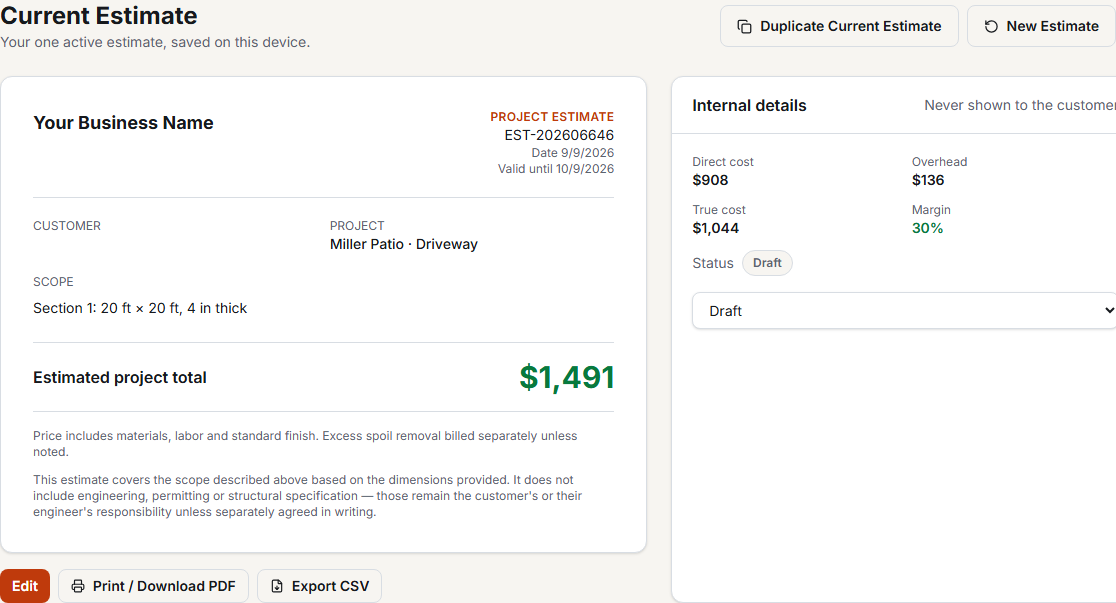
Concrete Cost Pro saves your material, labor and equipment rates, combines project sections and calculates the selling price needed for your target margin. Create a customer-facing estimate and compare the current job with its actual result. Keep invoicing in your existing billing process.

See Pro estimating and pricing

$79 lifetime launch price · Regularly $99 · No monthly subscription

See Concrete Cost Pro features
Concrete Cost Pro customer estimate with scope and price, separate from internal job costs

Concrete Invoice Template questions

Is this invoice template free?

Yes. You can edit the invoice, add charges, calculate tax and payments, and print or save a PDF without an account or purchase.

Does it send invoices or accept online payments?

No. Download the PDF and send it using your own email or billing process. Payment instructions are text on the document; they do not create a payment link or process a transaction.

Can I invoice per square foot or cubic yard?

Yes. Enter the unit, quantity and agreed price per unit. For lump-sum work, use quantity 1 and the agreed charge as the rate.

Are invoices saved in Concrete Cost Pro?

This free billing tool does not save invoices. The paid product focuses on estimating, saved business rates, the current estimate and estimate-versus-actual tracking; it is not an invoice archive or accounting system.