
One price. Every job, priced right.
Concrete estimating and job-profitability software without another monthly contractor subscription.
- No sign-up required
- Free calculators, no purchase needed
- One-time payment for Pro, no subscription
- Your data stays on your device
$79 one-time purchase. No monthly subscription.
Current launch price: $79. Planned regular price: $99. Buy at $79 and that's your price for good; it never changes for you after you buy, even once launch pricing ends.
- Saved costs, materials, labor and equipment catalog
- Reusable project templates
- Multi-section project estimating
- Overhead and target-margin pricing
- Rate Health audit and required-price solver
- Material, labor and equipment cost-change scenarios
- Branded, customer-ready estimate PDFs
- Current estimate vs. actual job tracking
- Contractor-facing CSV export for your records
- One-click duplication to start a new estimate from the current one
- Business profile with saved defaults
- One-click backup of your catalog, rates and templates
- No account required, runs in your browser
- No monthly subscription, ever
One payment for the estimating workflow. Save business rates, check your target price and export the current estimate for your records.
Free calculators are always available with no purchase. Pro adds saved data, job costing and estimate tracking.
By purchasing, you agree to our Terms and Refund Policy.
Before you buy
What's included
Saved rates, multi-section estimating, Rate Health, cost-change scenarios, branded PDFs, CSV export, estimate-vs-actual tracking and JSON backup. Full list below.
What happens after payment
You're redirected back and unlocked immediately in the browser you paid from. A welcome email with your license key is also sent, for your records.
How access is delivered
By license key, emailed to you and stored in the browser you purchased from. No account or password to set up.
Supported devices & browsers
Any modern web browser, on any device: desktop, laptop, tablet or phone.
Data backup
Settings → Export business data downloads a JSON file of your profile, catalog, rates and templates, importable on another device.
Switching computers
Enter your license key (or use "Forgot your key?") to unlock the app on the new device, then import your JSON backup to bring your saved rates over.
Refund policy
Email us within 14 days of purchase for a full refund, no questions asked. See the full refund policy.
Support
Message us through the contact page. We read every message.
Free vs. Pro, the short version
| Free calculators | Concrete Cost Pro |
|---|---|
| Calculate one project's quantity, cost and required price | All of that, plus your rates saved for next time |
| Re-enter materials, labor and equipment costs every visit | Saved catalog and business defaults, filled in automatically |
| One project at a time, nothing saved | Reusable templates, one autosaved current estimate, duplication to start the next job |
| No audit of your existing standard rates | Rate Health flags any standard rate below target margin |
| Print or save a document you build by hand | Branded PDF, CSV export, and estimate-vs-actual tracking |
Good fit if…
- You price more than one concrete job for customers, not just a single project
- You want overhead and target margin factored into every quote automatically
- You're comfortable with a browser-based tool that saves data on your device, not the cloud
Not a fit if…
- You need multiple people on different devices sharing the same saved data in real time
- You need blueprint/PDF takeoff, scheduling, CRM, accounting or payroll features
- You're pricing a single one-off project and don't need saved rates or repeat use (a free calculator is the better fit)
Illustrative example, not a promised saving
What one margin mix-up is worth
Say a $12,000 job was actually priced at a 25% margin (true cost $9,000) instead of the contractor's real 30% target. Pricing that same $9,000 true cost at a true 30% margin requires $12,857.14 — a difference of about $857 on this one job.
Illustrative only: this is one example calculation, not a projection of your results. Verify: at $12,000 against a $9,000 true cost, the margin is 25%, confirming the 25% starting point above.
See it before you buy
A few of the tools included
Everything above (rates, templates, estimates, tracking) is real software, not just a feature list. Here's a sample of it.
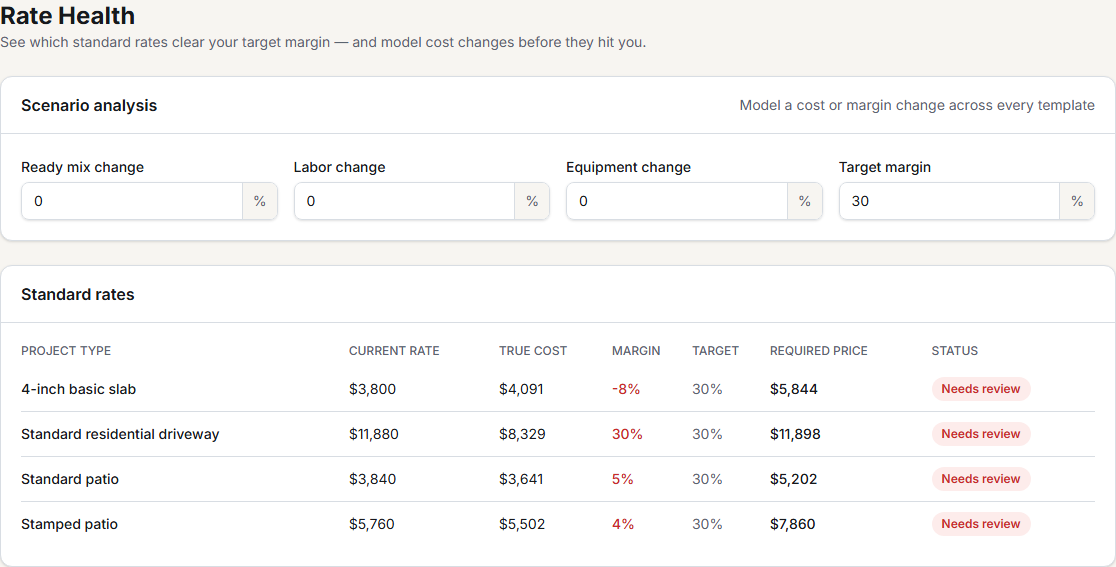
Rate Health flags underpriced standard rates
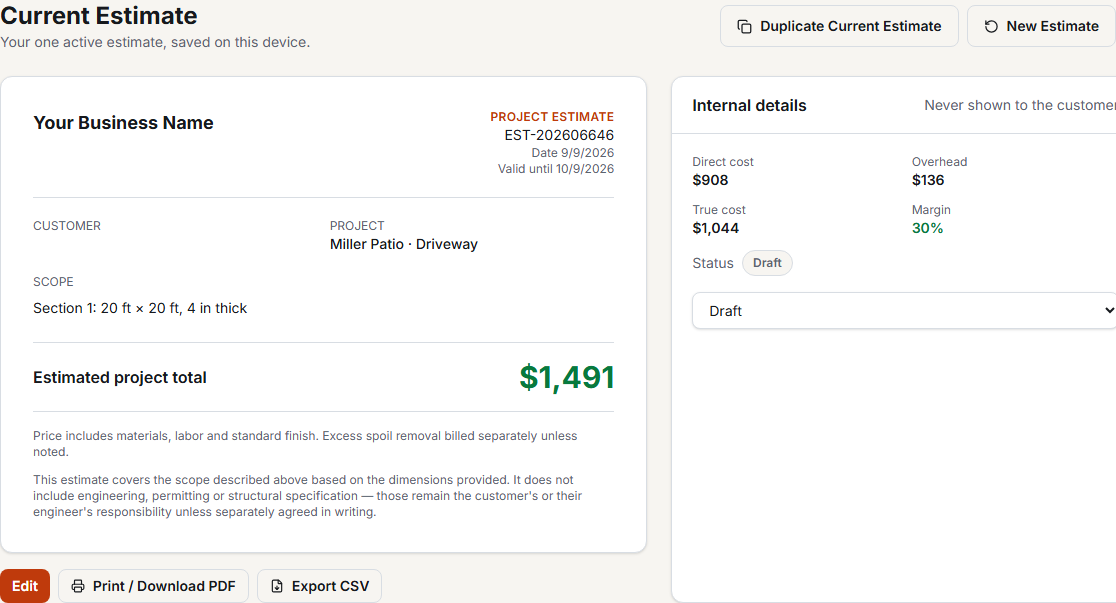
Branded estimates, cost and margin kept private
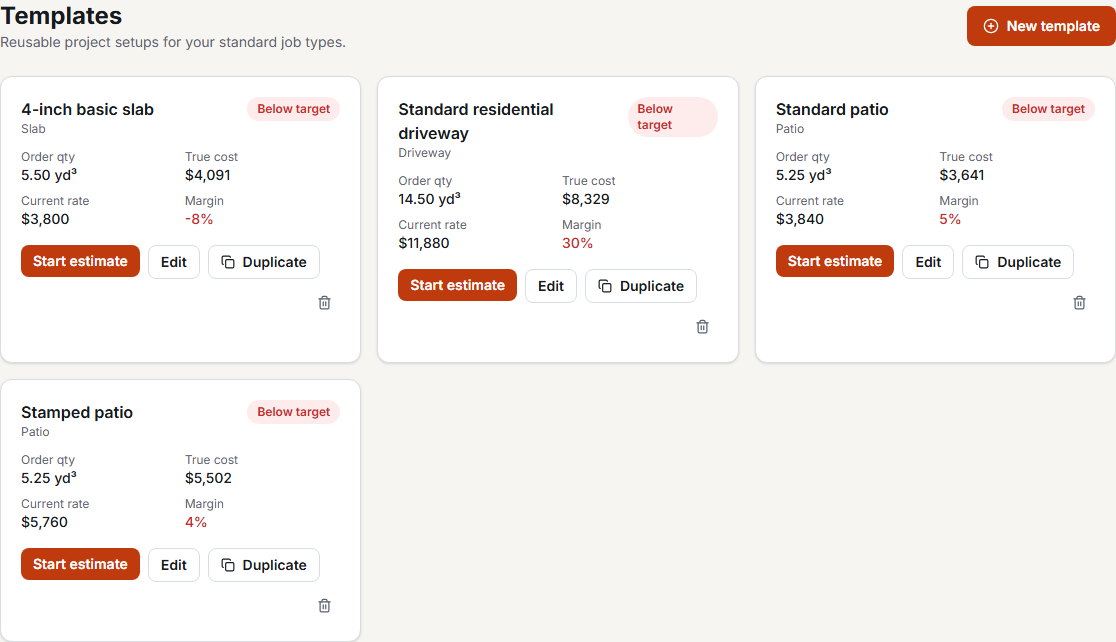
Reusable templates for your standard jobs
Pricing questions
Is $79 a permanent price?
$79 is the launch price. Once launch pricing ends, new purchases move to the regular $99 price, but it's a one-time payment, not a subscription, so your price never changes after you buy. Buying now locks in $79 for as long as you use the product.
Does Concrete Cost Pro keep a history of my past estimates?
No. Concrete Cost Pro keeps exactly one current estimate at a time, autosaved on this device. Starting a new estimate replaces it after you confirm; download a PDF or CSV first if you want to keep a copy. There is no estimate archive or project history inside the app.