
Free contractor tool
Concrete Pour Calculator
Calculate the concrete needed for one pour or several rectangular sections. Enter your specified length, width and thickness for each section, add an order allowance and round the combined quantity upward to your supplier's increment.
No signup · Uses your own inputs · No automatic cloud storage
Pour section 1
Order allowance and rounding
Concrete pour quantity
Allowance is applied once to the combined volume, then the order is rounded upward once. Inputs are illustrative dimensions, not a thickness recommendation.
How to use this calculator
- Divide the pour into non-overlapping rectangular sections. Enter length and width in feet, and the specified concrete thickness or depth in inches.
- Add separate sections for changes in width or depth. Label each so you can reconcile it with your drawing or measurements.
- Set the allowance for your site and choose the supplier's order increment. The tool applies allowance to the combined net volume and rounds the total once.
- Review section volumes and the final cubic-yard order. Confirm dimensions and ordering terms before sending the quantity to your supplier.
Example: main pad plus a separate walkway
The dimensions below are arithmetic examples, not structural specifications. The pad and walkway do not overlap.
| Calculation or charge | Result |
|---|---|
| Pad: 20 ft × 10 ft × 4 in ÷ 324 | 2.469 yd³ |
| Walkway: 30 ft × 3 ft × 4 in ÷ 324 | 1.111 yd³ |
| Combined net volume | 3.580 yd³ |
| After 8% allowance | 3.867 yd³ |
| Round total upward to 0.25 yd³ | 4.000 yd³ |
Calculate the volume of each section first. Applying allowance and rounding once at the end avoids adding a separate rounding increment to every small section. This tool does not split the order into truckloads.
The formula behind a concrete pour
For these input units, cubic yards = length in feet × width in feet × thickness in inches ÷ 324. The divisor combines 12 inches per foot and 27 cubic feet per cubic yard. For example, 20 × 10 × 4 ÷ 324 gives 2.469 cubic yards before allowance.
A larger footprint or specified depth increases the volume directly. If thickness varies over the pour, use measured or design-specified sections rather than treating the deepest area as the thickness of the whole footprint. The tool does not choose thickness, strength, reinforcement or footing dimensions.
Measure L-shapes without double-counting
Split an L-shaped footprint into two rectangles that meet at an edge. Do not use the full length of both legs if that counts the corner twice. For openings or excluded areas, calculate the remaining footprint as smaller positive rectangles; this calculator does not accept negative sections.
Steps, slopes, curved edges and tapered footings may require geometry outside this rectangular tool. Break only genuinely rectangular parts into sections and obtain the remaining volume from a reliable drawing or takeoff. Do not disguise an unknown shape by guessing a rectangular dimension.
Net volume, allowance and rounding are separate
Net volume is the geometric amount. Allowance is the additional percentage you select for site variation and handling. Order rounding is a further increase to the next available supplier increment. The result shows each addition so you can see why the ordered amount exceeds the measured pour.
If sections will be poured on different days, run each delivery group separately because each order may have its own rounding and supply fees. An allowance is not a guarantee against shortage, and more concrete is not always better. Confirm subgrade conditions, dimensions and delivery planning with the people responsible for the work.
Continue your concrete workflow
Use the order quantity from this result to add supplier rates and delivery fees.
Add material schedule quantities for specified formwork and reinforcement.
Include labor, forms, reinforcement and equipment for a slab installation.
Use inch-based footing width and depth with footing-specific cost guidance.
Concrete Cost Pro · One-time purchase
Carry multiple sections through to a customer estimate
Concrete Cost Pro combines project sections with saved business rates, labor and equipment costs. Calculate true job cost and target-margin selling price, create a customer estimate and compare the current job's estimated and actual results. The free pour tool gives you quantity; Pro builds the estimating workflow.
See multi-section estimating in Pro$79 lifetime launch price · Regularly $99 · No monthly subscription
See Concrete Cost Pro features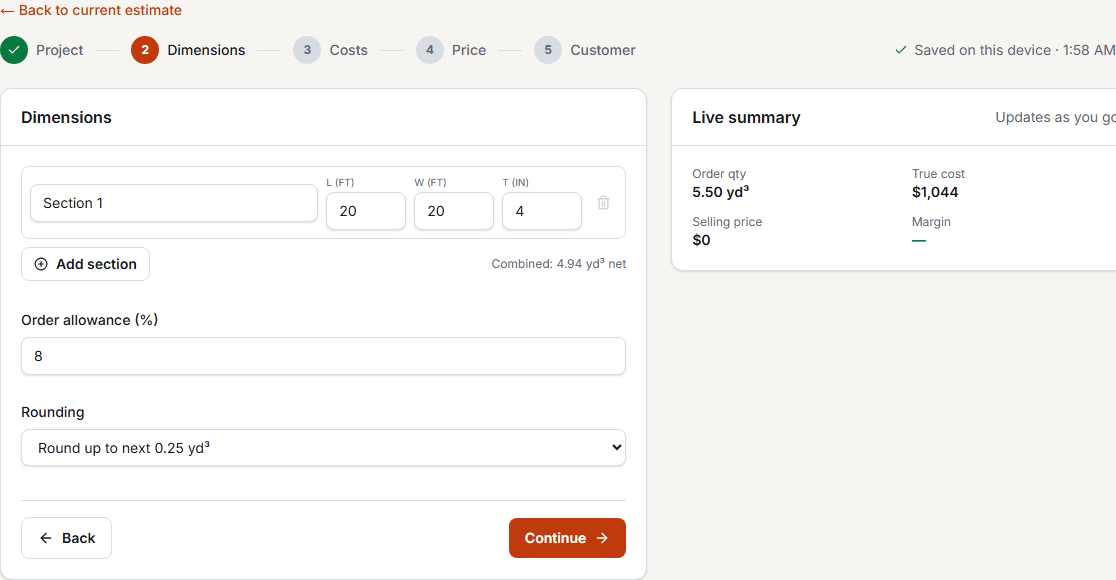
Concrete Pour Calculator questions
Can I calculate an L-shaped pour?
Yes, if you split it into non-overlapping rectangles. Add each rectangle separately; do not count the shared corner twice.
Why divide by 324 instead of 27?
Thickness is entered in inches while length and width are feet. Dividing by 324 converts inches to feet and cubic feet to cubic yards in one step. If all dimensions were feet, the divisor would be 27.
What allowance should I enter?
Use the allowance appropriate to your measurements, site conditions and delivery plan. The sample 8% is for illustration; this tool does not prescribe a universal percentage.
Can this calculate the pour cost too?
This page focuses on quantity. Send the final order quantity to the ready-mix cost tool, or use a project-specific cost calculator to add installation costs.